
Multi-Entity Payroll Distribution for New Zealand environments
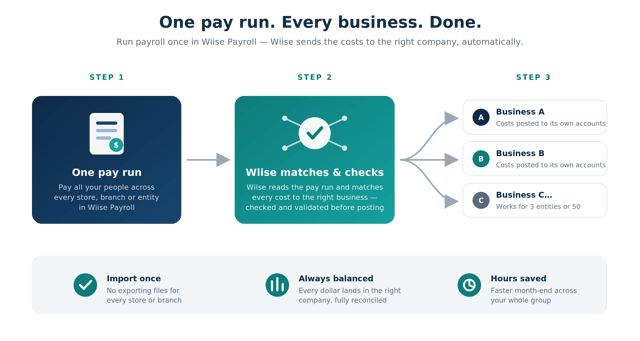
To help Group Financial Controllers and Payroll Officers eliminate the administrative burden of per-entity payroll imports, we've introduced a single-file, multi-entity payroll distribution engine that takes one payroll file from Employment Hero or KeyPay and automatically routes GL entries to the correct Wiise entity.
Previously, businesses running multiple legal entities had to process payroll one entity at a time - exporting individual files, switching between environments, and importing into each company one by one. A business with 50 stores meant 50 separate imports every pay cycle, with manual GL journaling and month-end reconciliation that consumed hours and introduced errors.
What you can now do:
- Configure entity-to-business mappings once in the new Multi-Entity Payroll Setup page
- Trigger a single import and distribute action from the Head Office environment
- Validate all mappings and permissions before anything hits the GL unmapped entities and permission errors surface before posting
- Route GL entries automatically to each entity's ledger on confirmation
- Track the status of each entity import in real time via the Batch Progress page
- Trace every posted entry back to the source Payroll File ID and Head Office batch ID
What this means for you: one pay run, one import action, and Wiise handles the rest. Routing costs to the right entities and giving the financial controller a clean, reconciled view across the group without touching a single manual journal.
What you need to do: configure entity-to-business mappings in the Multi-Entity Payroll Setup page before triggering your first multi-entity import.
This is especially valuable for retail chains, aged care groups, franchise networks, and any multi-entity business running Employment Hero or KeyPay across multiple Wiise environments.
GTM IQ
Self-service user management
Admins can now add and manage their own GTM IQ users directly, with no need to raise a ticket with Wiise.
To help admins get new starters into GTM IQ without waiting on us, we've added self-service user management in Settings.
- Add a new user from Settings > Users > Add user.
- Assign each user a role: member or admin.
- New users are whitelisted automatically and can log in straight away.
- Admins manage other users and business context; members work in the product without touching setup underneath it.
This is especially valuable for admins onboarding new reps, ops staff, or anyone who needs access fast, without a support queue in the way.
Sharper prospecting and SPICED reports
Prospect Discovery and SPICED reports now run on a rebuilt intelligence layer, so what comes back is grounded, verifiable, and ready to use.
To help reps spend less time double-checking results and more time selling, we've rebuilt the intelligence layer behind Prospect Discovery and SPICED reports: upgraded models, reworked prompt architecture, and Exa as the discovery and search source.
- Prospects are grounded in real, retrievable sources you can click through.
- SPICED reports are built from richer context about the account.
- The workflow hasn't changed: same Prospect Discovery, same SPICED report, just what comes back is stronger.
This is especially valuable for reps and sales leads who take prospecting and SPICED outputs straight into a call.
Geography filtering in Prospect Discovery
Prospect Discovery now filters by your actual sales territory, so every result is one you could genuinely sell to.
To help reps stop filtering unreachable companies by hand, we've added geography filters to Prospect Discovery, driven by where your business actually sells.
- Set your sales geographies (countries, states, cities) in Business context.
- See those geographies applied as filters in Prospect Discovery automatically.
- Narrow further per search: run a national search one day, a single-metro search the next.
- Update your territory in Business context whenever it changes, and the filters follow.
This is especially valuable for any business with a defined sales footprint: a distributor covering one state, a manufacturer selling across ANZ, or an exporter with specific markets.
Xero as a live data source
GTM IQ can now connect directly to Xero, so customer scoring, ICP, and monitoring run on live data instead of a file upload.
To help Xero customers get the same always-current intelligence as Business Central customers, we've built a direct Xero connection: authorise once and GTM IQ reads your Xero data as a live source, no export, no upload, no re-upload.
- Connect Xero through the standard consent screen and pick your organisation.
- Customer scoring, ICP, and monitoring run against current Xero data.
- No more manual re-uploads to keep GTM IQ current.
This is especially valuable for GTM IQ customers running Xero as their financial system of record, typically smaller ANZ businesses currently getting data in via file upload.
Excel and Xero file upload
GTM IQ now runs on Excel files and Xero exports, not just Business Central data.
To help businesses that don't run Business Central, or that want to test GTM IQ on their own data first, we've added file upload as a data source.
- Upload a standard Excel file against a defined schema.
- Upload Xero report exports (CSV or Excel) natively, with no reformatting required.
- GTM IQ validates the file, flags anything it can't read, and runs customer scoring and ICP off the result.
This is especially valuable for Xero customers and anyone who wants to put real data through GTM IQ on day one instead of waiting on an integration.
Microsoft sign-in without a Business Central tenant
Customers without Business Central can now sign in to GTM IQ directly.
To help Xero and file-upload customers actually get into the product, we've decoupled sign-in from the Business Central tenant.
- Sign in with a Microsoft account, with no Business Central identity required.
- Admins add users from Settings as usual.
- Once signed in, users work off Xero or an uploaded file as their data source instead of Business Central.
This is especially valuable for Xero businesses getting their team into GTM IQ for the first time, with no Business Central and no help from us required.
GTM IQ is available now as an Early Access Program for existing Wiise customers. For more information please visit this page
Knowledge Base articles: