
We've continued expanding Wiise's NDIS capabilities with a set of interconnected updates that close the loop on the full claim lifecycle. These updates help NDIS providers recover revenue faster, keep their books accurate, and manage claim activity without switching between systems.
NDIS Credit Note for Rejected Claims
When the NDIA rejected a payment request, the original posted sales invoice remained open in Business Central with no corresponding reversal. Finance staff had to manually create a sales credit note, match it to the correct invoice, and ensure the amounts aligned a tedious, error-prone process that left open receivables sitting on the books and made month-end reporting unreliable.
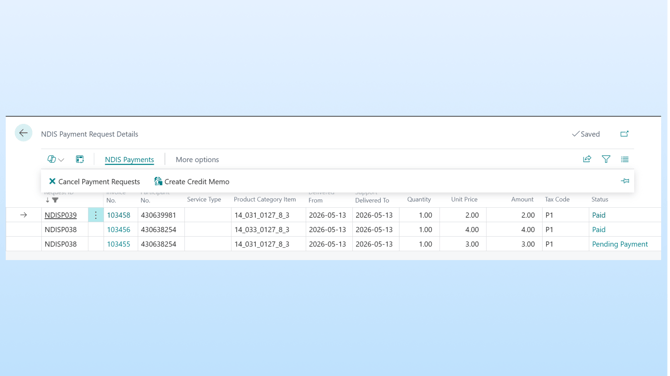
To help you clean up rejected claims without manual journal work, we've introduced the ability to create a sales credit note directly from a rejected payment request. Users can review the rejected claim on the Payment Details page, select it, and generate a credit note that is automatically linked to the original posted invoice closing the open receivable immediately and keeping financials accurate.
This is especially valuable for Finance Managers and Accounts Receivable officers responsible for ensuring open receivables reflect reality at month-end.
Cancel Claim and Auto Credit Note
When a provider needed to cancel a previously approved payment request due to a service not delivered, incorrect billing, or a participant dispute the process was entirely manual. Staff had to log into the NDIA myPlace portal to submit the cancellation, then separately create a credit note in Business Central and manually reconcile the two. Every cancellation meant duplicated effort across two systems.
To help you eliminate this dual-system process, we've introduced automated credit note generation on claim cancellation. Users select one or more approved payment requests from the Payment Details page and submit cancellations directly via the NDIA API. Once the NDIA confirms cancellation, Wiise automatically creates a corresponding sales credit note linked to the original invoice, no manual entries required. Failed cancellations surface clear error messages with retry options.
This is especially valuable for finance teams managing high claim volumes where manual cancellation reconciliation creates significant overhead and compliance risk.
Resubmit Rejected Claims
When the NDIA rejected a claim, users had to manually investigate the rejection reason, correct the underlying invoice data, and recreate the payment request from scratch. This was time-consuming and error-prone and the frustrating reality is that most rejections are for entirely fixable issues. A transposed participant number, an expired service booking reference, or a date range that didn't align with the plan. The service was legitimately delivered, but a small data error meant the provider wasn't getting paid.
To help you recover revenue that has already been earned, we've introduced a streamlined resubmission workflow for rejected claims. Rejected payment requests now display the NDIA rejection reason code and full description directly inside Wiise. Users can review the reason, correct the relevant invoice data using the Sales Invoice Line Update page, and resubmit the corrected claim without recreating the payment request from scratch.
This is especially valuable for Finance Managers and AR officers processing large monthly claim batches where even a small number of unresolved rejections can represent significant revenue leakage over time.
NDIS Role Centre Widgets
Finance teams had no centralised view of claim and payment activity. Understanding what had been submitted, what was pending, what was paid, and what was rejected required switching between Wiise and the NDIA portal and tracking statuses manually in spreadsheets.
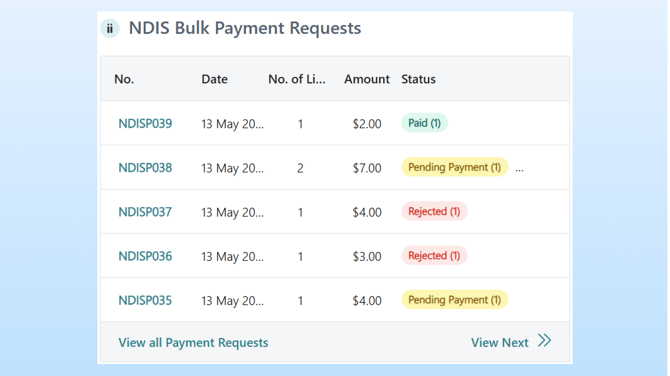
To help you start each day with a clear picture of their NDIS financial position, we've introduced two new Role Centre dashboard widgets.
The Bulk Payment Requests widget displays Payment Request ID, submitted date, number of lines, total amount, and a combined status summary showing at a glance how many lines are pending payment, paid, or require attention. Clicking any line drills directly into the full payment details.
The Remittance Advices widget shows Remittance Advice number, import and payment date, number of lines, payment amount, and status. Giving immediate visibility of payments received from the NDIA.
Together, these widgets give finance leaders the ability to answer the questions that matter how much has been submitted, what's pending, and what needs action. Without opening the NDIA portal.
This is especially valuable for Finance Managers and operations leaders responsible for NDIS cash flow and reporting accuracy.
Knowledge Base articles