
Overview:
-
Read the remittance advices widget on your NDIS dashboard.
-
Understand what each column shows.
-
Open a remittance advice to view its details.
-
Interpret the status of a remittance advice.
Why Use the NDIS Remittance Advices Widget?
The remittance advices widget gives you an at-a-glance view of all payments received from the NDIA without leaving your dashboard. You can view unprocessed remittances and drill into the detail of any payment within the widget.
Note: The widget displays as soon as the NDIS extension is installed. It lists all remittance advices sorted by remittance advice number, newest first.
How to Use the NDIS Remittance Advices Widget?
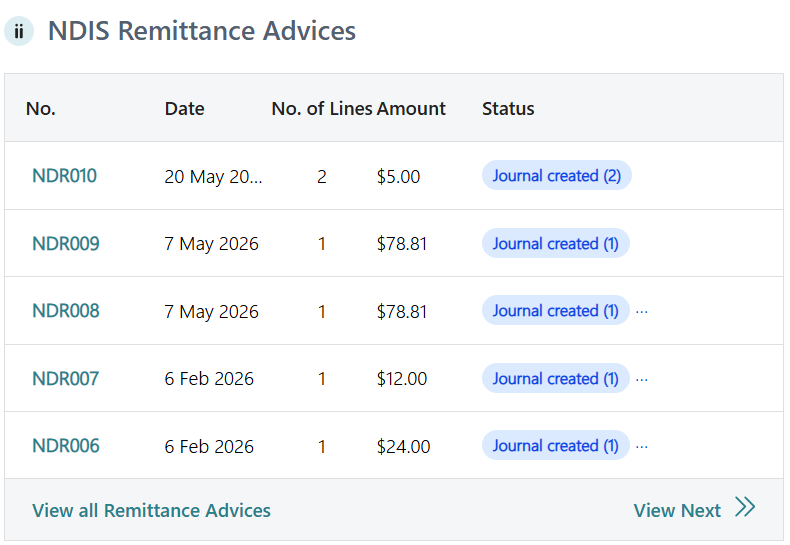
Read the remittance advices widget
Each row shows:
-
Remittance Advice No.: unique identifier for the remittance advice.
-
Import/Payment Date: the date the remittance was imported or payment was received.
-
No. of Lines: the number of line items included in the remittance advice.
-
Payment Amount: the total amount paid by the NDIA.
-
Status: the processing status of the remittance advice.
Open a remittance advice
-
Locate the remittance advice you want to review in the widget.
-
Select the Remittance Advice No to view the full remittance advice details.
-
The NDIS Remittance Entries page display.

- Here's what each column shows:
- Claim Date: the date the claim was submitted
- Claim No.: unique identifier for the claim
- Invoice No.: the associated sales invoice number
- Item ID: the NDIS support item code
- Claim Type: the type of claim
- Participant Name: the NDIS participant.
- Amount Claimed: what was submitted to the NDIA
- Amount Paid: what the NDIA actually paid
- Variance: difference between claimed and paid
- Document No.: the internal document reference
- Document Line No.: line number on that document
- Customer No. / Customer Name: the Wiise customer record linked to the participant
- Cash Receipt Line Created / Posted: checkboxes indicating journal status
- Invoice Already Applied: whether the invoice has been matched
- Note: From this page, you can select Edit List to update entries inline, or Open Journal Lines to view the associated Cash Receipts Journal.

Check the status of a remittance advice
Each remittance advice can contain multiple line items, and each line item can have its own status. The Status column shows all statuses in a single cell, with the number of lines in that status shown in brackets.
The possible statuses are:
-
Journal Not Created: the journal hasn't been created yet.
-
Journal Created: the journal has been created but not yet posted.
-
Journal Posted: the journal has been posted successfully.
Note: When a remittance advice has lines in multiple statuses, all statuses appear in the Status column separated by commas.
-
You now know how to use the NDIS remittance advices widget.
What's next
Find out how to Submit a bulk payment request and receive payment.
Need more help?
No problem, that's what we're here for. Reach out to support@wiise.com anytime you can't find what you're looking for.