
We’ve continued expanding Wiise with new AI-powered planning tools, stronger governance workflows, and improved NDIS insights and security. These updates help finance teams budget faster, enforce better customer onboarding controls, and give NDIS providers clearer financial visibility while reducing manual work and risk.
AI: Budget Forecast
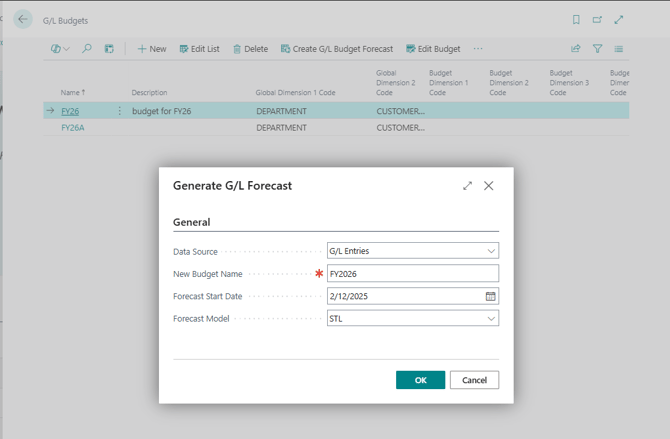
Budget planning in many organisations relied heavily on exporting financial data to Excel, manually modelling forecasts, and re-entering results back into G/L Budgets. This process was slow, error-prone, and difficult to maintain as plans changed, often causing budgeting cycles to stretch over weeks and pushing teams to external tools instead of working directly within Wiise.
To address this, we’ve introduced AI: Budget Forecast, which uses a built-in forecasting engine to analyse historical G/L Entries and automatically generate projected budget amounts by account, dimension, and period.
Users can open G/L Budgets, select Create G/L Budget Forecast, choose their data source, forecast model, and budget name, and generate a system-created forecast. The forecast can then be reviewed, adjusted, and published directly into G/L Budget entries.
This provides finance teams with a faster, more consistent starting point for planning and enables AI-assisted budgeting directly within Wiise, reducing reliance on spreadsheets and allowing budgets to be easily refreshed as the year evolves.
Block New Customer Approval Workflow
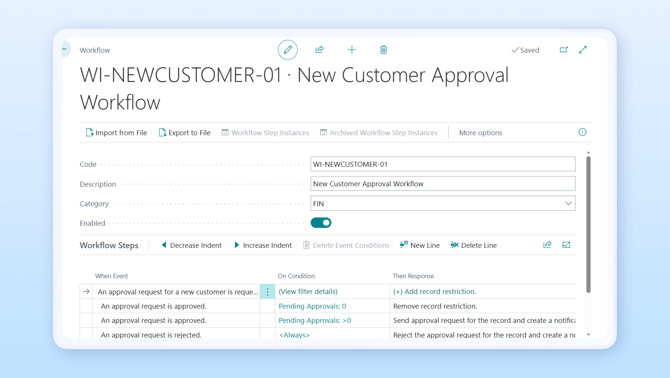
Previously, new customers could be created and used immediately in transactions, often relying on manual checks such as emails, spreadsheets, or verbal approvals, to validate details like ABN information, credit terms, or duplicate records. This made it harder to enforce onboarding controls, increased the risk of duplicate or incorrect customer records, and created challenges when demonstrating compliance and segregation of duties during audits.
To improve governance around customer onboarding, we’ve introduced the Block New Customer Approval Workflow. Newly created customers can now be automatically blocked from posting until an approval request is completed.
When a user creates a new customer, they can submit it for approval. A designated approver such as a finance manager, reviews the record before approving it for use. Once approved, the system updates the customer’s blocked status and records who approved the request and when.
Until approval is granted, the customer cannot be used on sales documents or postings, depending on configuration.
This ensures customer records are reviewed before becoming active, helping organisations maintain cleaner customer data, reduce credit risk, enforce segregation of duties, and maintain a clear audit trail for onboarding decisions.
NDIS Permission Sets
For NDIS providers using Wiise, access to key NDIS pages such as Payment Requests, Product Catalogue setup, PRODA configuration, and dashboards, previously required SUPER permissions. This forced organisations to grant broader access than necessary, creating potential security and compliance risks while slowing down operations when everyday tasks had to be performed by a small number of highly privileged users.
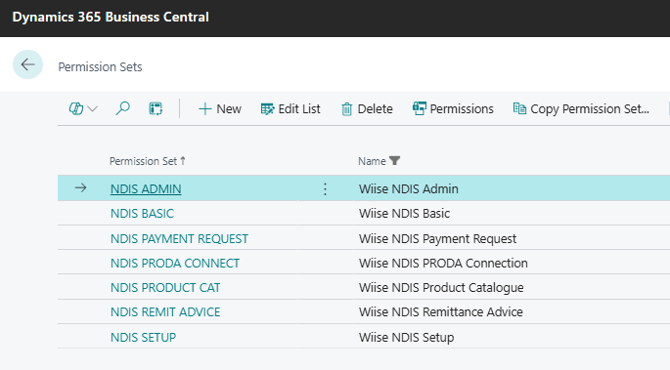
To address this, we’ve introduced dedicated NDIS permission sets that allow administrators to assign the appropriate level of access to different roles.
New permission sets include NDIS Basic, Setup, PRODA Connection, Product Catalogue, Payment Request, Remittance Advice, and NDIS Admin, allowing organisations to control which users can view, configure, or process NDIS-related information.
This change enables least-privilege access, improves segregation of duties, reduces the need for SUPER permissions, and allows teams to work more efficiently while maintaining stronger security controls.
NDIS Financial Dashboards
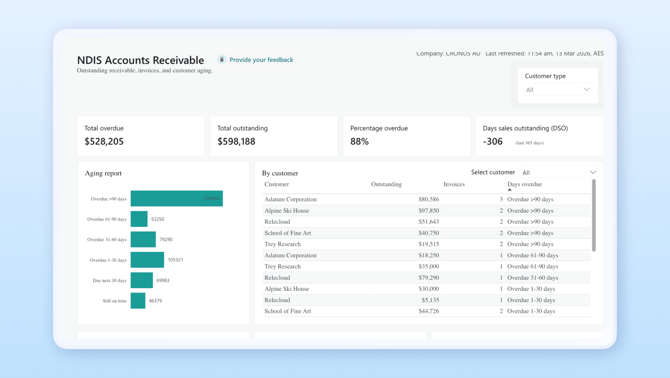
NDIS providers often relied on exporting data to Excel or running multiple reports to understand NDIS invoices, collections, and payments. Without a single visual view of NDIS receivables and payables, it was difficult to monitor cash flow, identify ageing debts, or detect potential issues early.
To provide clearer financial visibility, we’ve introduced NDIS Financial Dashboards. These dashboards surface key Accounts Receivable (AR) and Accounts Payable (AP) metrics for NDIS in a single, visual view inside Wiise.
Finance and operations teams can now monitor NDIS debtors, track payment activity, and identify trends without leaving the system.
With always up-to-date dashboards available directly in Wiise, NDIS providers can make faster decisions, manage cash flow more effectively, and reduce reliance on spreadsheets and manual reporting.
Knowledge Base articles
-
AI: Budget Forecast: Create G/L Budgets
-
New Customer Approval Workflow: Set up Approval Workflows for New Customer
-
NDIS Permission Sets: Set Up NDIS Permissions
-
NDIS Financial Dashboards: Use NDIS Financial Dashboard in Power BI
-
View Power BI NDIS Financial Dashboards in Wiise: Set Up and View Power BI NDIS Dashboards in Wiise