
Overview
-
Learn how to set up NDIS permissions for users
-
Restrict NDIS changes to authorised users
-
Maintain financial and operational control over NDIS processes
Note: When setting up NDIS for the first time, the user performing the setup must have the NDIS Admin permission assigned. This permission provides full administrative access to all Wiise for NDIS features, allowing the user to configure connections, setup options, and manage NDIS functionality.
Why set up NDIS Permissions?
NDIS permissions control what users can view or manage within the Wiise NDIS features. Assigning the correct permission set ensures users only access the functionality required for their role.
The following permission sets are available for Wiise NDIS:
|
Permission Set |
Access Level |
Description |
|
NDIS BASIC |
Read only |
Users can view NDIS dashboards and pages but cannot edit or run actions. |
|
NDIS SETUP |
Modify setup |
Users can configure NDIS system settings in Wiise NDIS Setup and Wiise NDIS Azure Setup. |
|
NDIS PRODA CONNECTION |
Manage connection |
Users can configure and manage the NDIS PRODA connection. |
|
NDIS PRODUCT CATALOGUE |
Manage catalogue |
Users can import and maintain the NDIS product catalogue and manage notifications. |
|
NDIS PAYMENT REQUEST |
Manage payments |
Users can create and manage NDIS bulk payment requests. |
|
NDIS REMITTANCE ADVICE |
Manage remittance |
Users can manage remittance advice setup and remittance import logs. |
|
NDIS ADMIN |
Full access |
Users have full access to all NDIS setup, operations, and dashboards. |
Understand Wiise for NDIS Permissions?
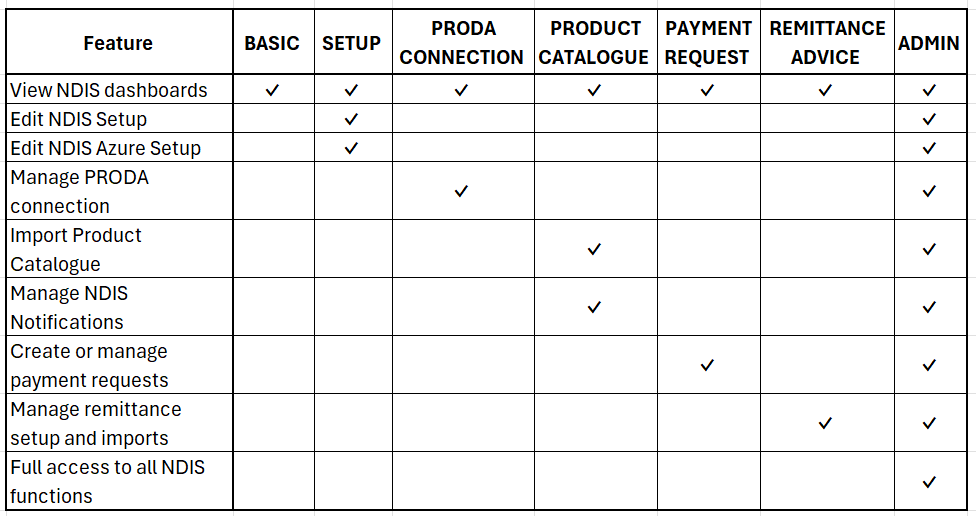
The table below shows what each permission set allows users to do.
Understand the Recommended NDIS Permission Roles?
The table below shows common permission assignments based on user roles in your NDIS business:
|
Role |
Recommended Permission Set |
Reason |
|
Finance officer |
NDIS PAYMENT REQUEST |
Allows the user to create and manage NDIS payment requests. |
|
Finance administrator |
NDIS REMITTANCE ADVICE |
Allows the user to import and manage remittance advice from NDIS. |
|
System administrator |
NDIS ADMIN |
Provides full control over all NDIS configuration and operations. |
|
Integration administrator |
NDIS PRODA CONNECTION |
Allows the user to manage the PRODA device and connection setup. |
|
Catalogue administrator |
NDIS PRODUCT CATALOGUE |
Allows the user to import and manage the NDIS product catalogue. |
|
Operations staff |
NDIS BASIC |
Allows users to view dashboards and monitor NDIS activity without making changes. |
Note: Best Practices for NDIS Permissions
To maintain strong security and system control you'll need to:
- Assign NDIS BASIC permissions to most users who only need to view information
- Restrict NDIS ADMIN permissions to a small number of administrators
- Separate financial permissions between payment processing and remittance management
- Regularly review permission assignments to ensure users only have access required for their role
This approach helps protect financial processes and ensures that NDIS system configuration is only managed by authorised users.
What users see when access is blocked?
When a user without the required permission attempts a restricted action, Wiise displays a specific error message rather than a generic system error.
| Page | Blocked action | Error message displayed |
|---|---|---|
| PRODA Connection Setup | Open wizard | You do not have permission to set up an NDIS PRODA connection. Please contact your administrator. |
| Product Catalogue Setup | Open wizard | You do not have permission to import the NDIS Product Catalogue. Please contact your administrator. |
| Bulk Payment Request | Open wizard | You do not have permission to manage NDIS payment requests. Please contact your administrator. |
| Remittance Import Setup | Open wizard | You do not have permission to manage NDIS Remittance Advices. Please contact your administrator. |
| NDIS Connection Dashboard | Write or setup action | You do not have permission to set up an NDIS PRODA connection. Please contact your administrator. |
| Product Catalogue Import Dashboard | Trigger import | You do not have permission to import the NDIS Product Catalogue. Please contact your administrator. |
| Remittances Import Log | Retry import | You do not have permission to manage NDIS Remittance Advices. Please contact your administrator. |
| Remittances Entries | Update payment batches | You do not have permission to manage NDIS Remittance Advices. Please contact your administrator. |
| NDIS Notifications | Import, Process All, Process Selected | You do not have permission to manage NDIS Notifications. Please contact your administrator. |
Widget behaviour for users without NDIS permissions
If a user without any NDIS permission set navigates to the role centre, the NDIS widgets display an inline message rather than a system error.
- NDIS Bulk Payment Requests widget displays: "Your user account does not have permission to view Payment Requests. Please contact your administrator."
- NDIS Remittance Advices widget displays: "Your user account does not have permission to view Remittance Advices. Please contact your administrator."
Note: Users with NDIS BASIC permissions can view both widgets in read-only mode and select links to open the relevant pages.
Need more help?
No problem, that's what we're here for. Reach out to support@wiise.com anytime you can't find what you're looking for.