
We've added two dashboards to the NDIS Finance Dashboard pack. Because Wiise is integrated directly with the NDIS, both run on live figures rather than static exports. Use Budget Overview to scan every participant's budget and spot what needs attention, then jump into Participant Insights to see what's going on for that participant and act.
Budget Overview – New Power BI Dashboard
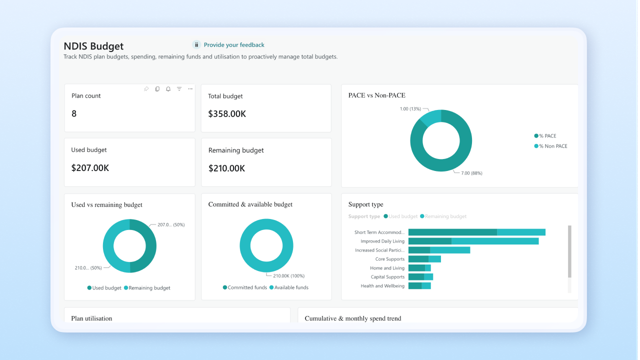
To help finance and ops teams see where every participant budget stands without chasing numbers across systems, we've added the Budget Overview dashboard to the NDIS Finance Dashboard pack.
Previously, a consolidated view meant exporting figures from a plan management platform that is out of date the moment they left the system, with no easy read on utilisation, committed funds, or expiring budgets.
What you can now do:
- See plan count and total budget across all participants, with used, committed, available, and remaining funds
- Break budget down by support type, with a PACE vs non-PACE participant view
- Track plan utilisation alongside cumulative and monthly spend trends
- Spot expiring budgets early, so you can act before funds are lost
What this means for you: one current view of every participant's budget, no manual exports, no guesswork. So you catch overspend or under-utilisation early. Spot something here, then drill into Participant Insights to act.
What you need to do: existing users will need to update to the latest NDIS Finance Dashboard pack to access it.
Participant Insights – New Power BI Dashboard
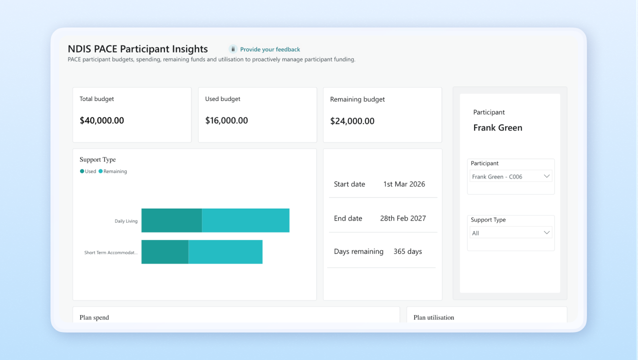
To help finance and ops teams check a single participant's position in seconds, we've added the Participant Insights dashboard to the NDIS Finance Dashboard pack.
Previously, answering "is this participant's plan on track?" meant digging through a plan management platform or manual records participant by participant which is slow, and rarely current.
What you can now do:
- Select any participant to see total, used, and remaining budget at a glance
- Break their spending down by support type
- View plan details and monthly spend over time, including start and end dates
- Read a utilisation gauge with over- and under-utilisation warnings that flag who needs attention
What this means for you: go from the portfolio-wide view in Budget Overview to a single participant in seconds, with clear warnings the moment a plan drifts off track. So participants get the support they're funded for and funds aren't left on the table before a plan expires.
What you need to do: existing users will need to update to the latest NDIS Finance Dashboard pack to access it.
These dashboards will be available to download and install from Microsoft Appsource.
Once installed, follow the prompts to connect your company data.
For more information, learn about how to use Power BI with Business Central here.
Knowledge Base articles: