
Overview:
- Understand how customer scoring works.
- Read your customer rankings.
- Read an individual customer's scorecard.
- Define what makes a customer best.
- Use niche segments.
Why this matters?
Your biggest customers aren't always your best. GTM IQ scores every customer in your database against a model built from the factors you care about by using your real transaction data, not gut feel, and explains every score. This ranking feeds your ideal customer profile, which feeds prospecting, so getting your best-customer definition right sharpens everything downstream.
Before you begin
-
You need a data source connected. Refer to Connect your data to GTM IQ.
Note: Rankings are only as good as the data behind them. If scores look off, check your data connection and profile coverage first.
How to FInd your Best Customers on GTM IQ
Step 1: Understand How Scoring Works
Every customer gets a fit score from 0 to 100, scored against your model.
- Gross margin
- Revenue / LTV
- Order frequency
- Growth trend
- Payment behaviour
- Strategic fit
- Premium product mix
- Tenure & loyalty
- Low service cost
Tip: You don't have to pick these yourself to get started. GTM IQ reads your company profile and takes a first pass at what "best" should mean for a business. It may give greater importance to growth trends and order frequency when compared with other variables. That's the model behind your first rankings, and you can redefine it any time (see Step 4).
Note: There's no black box. Every score comes with the evidence behind it, down to where the customer sits percentile-wise against the rest of your base, so you can see exactly why a customer ranked where they did.
Step 2: Read Your Customer Rankings
- Go to Customer rankings to see your best customers scored against your model
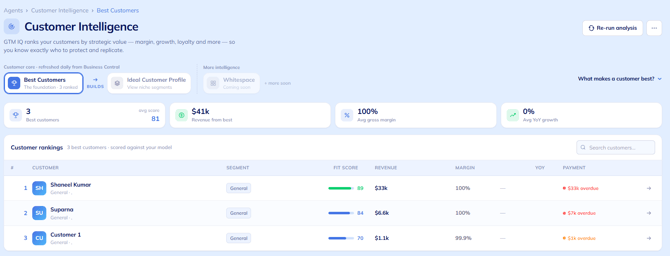
Note: Each row shows the customer's segment, fit score, revenue, margin, year-on-year growth and payment status so you can scan who's driving your business at a glance.
Step 3: Read a Customer's Scorecard
- Select any customer in the rankings to open their scorecard.
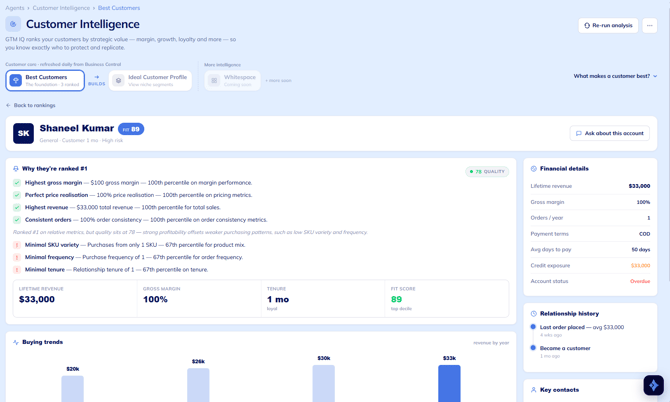
- Start with Why they're ranked as the evidence behind the position. Strengths are backed by your actual numbers (Strong gross margin are 80.3% which is 78th percentile), and flagged items call out the watch-outs, like weak payment reliability or slipping order frequency.
- Scan the rest of the scorecard:
- Buying trends and patterns: revenue by year, order frequency, average order value, peak month.
- Financial details: payment terms, average days to pay, credit exposure, account status.
- Relationship history: last order, quote win rate, fulfilment rate, customer tenure.
- Key contacts: the people you deal with, with their roles and emails.
Tip: Flagged watch-outs on high-value customers are early warning signs worth acting on, not just interesting reading.
Tip: Use Ask About This Account to ask questions about the customer you're currently viewing. The agent uses the account context in GTM IQ to provide more relevant and tailored answers specific to that customer.
Step 4: Define What Makes a Customer Best
GTM IQ's first pass at "best" is an educated guess based on your company profile. Pick the factors that matter most to you and the rankings recalculate to match.
- Open the What makes a customer best dropdown.
- Pick up to four factors that drive your definition.
- Select Save & Re-analyse. Every customer is rescored against your new model
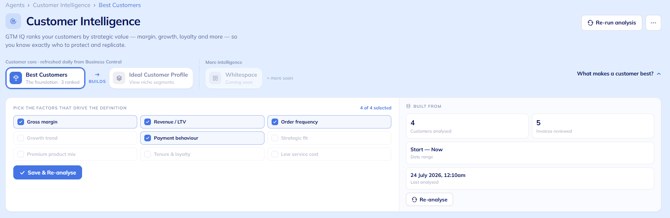
Tip: Re-analyse with a different set of factors and compare the two views as it often surfaces customers you've been under-valuing.
Step 5: Use Niche Segments
Your best customers cluster in patterns. GTM IQ groups your top customers into the niche segments you sell into best and you'll see each customer's segment right in the rankings, rather than flattening everyone into one generic "ideal customer". These segments are the starting point for your ideal customer profile.
How to Troubleshoot Best Customers
The scores look wrong: Check your data connection is synced and your profile coverage isn't thin. If you're on an Excel upload, check the recommended fields (payment terms, returns, product detail) were included. Missing fields mean missing signals.
A customer I know is great ranks low. Check which factors are selected under What makes a customer best? The current model may not match what you value. You'll need to pick different factors, select Save & Re-analyse, and the rankings recalculate.
Need more help?
No problem, that's what we're here for. Reach out to support@wiise.com anytime you can't find what you're looking for.