
Overview:
- Understand what the GST Agent checks and when it runs.
- Read and act on GST issues flagged on a posted document.
- Dismiss, accept, or reject a flagged suggestion.
Note: The Wiise GST Agent is available as part of a limited beta program in Wiise Australia. This feature is not available for Wiise New Zealand yet.
For questions or to join the beta program, please contact support@wiise.com
Why Use the GST Agent to review GST issues?
GST errors caught after lodgment create rework, amended BAS submissions, and potential ATO scrutiny. The GST Agent checks each transaction as you post it, so you fix issues before they reach your Business Activity Statement (BAS).
How the GST Agent works?
The GST Agent evaluates each in-scope transaction when you post it. It combines your transaction history, past transactions, typical GST patterns for that customer, supplier, or item, with configured GST rules to decide whether an anomaly exists.
Open the Wiise GST Agent widget on your Wiise landing page for a summary of flagged issues and their status.
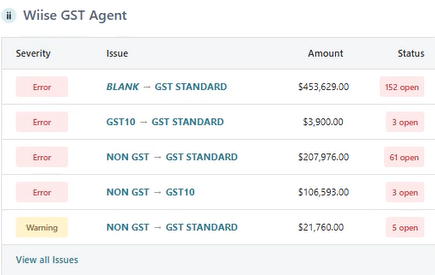
Tip: The panel shows both Error and Warning severity levels. Errors indicate likely incorrect GST treatment; warnings flag items worth reviewing but not necessarily wrong.
Note: The GST Agent runs at the point of posting. It doesn't retrospectively check documents posted before the feature was enabled.
How to review GST issues on a posted document?
- You'll need to post your transaction via a sales invoice, purchase invoice, credit memo, or journal.
- If the GST Agent detects an anomaly, the GST Agent panel appears on the posting screen.
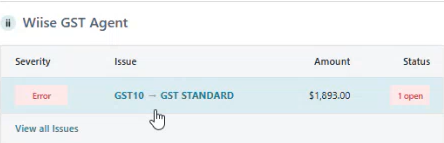
- Read the summary at the top of the panel. It confirms that GST issues were found.
- Review the line-level list. Select the hyperlinked line-level issue. You'll be directed to the GST Issues list.
- Each entry shows the line number, the affected fields, and a short explanation such as the expected GST% versus what was entered.

- You can either Dismiss issue or Accept Suggestion.
- You now know how to use the GST Agent to review GST issues.
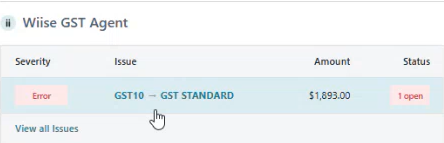

Note: Select Dismiss or Accept Suggestion. In the beta version, both actions behave the same, but in later releases dismissing will prevent repeat flags for the same case.
Advice: If you're unsure whether the agent's suggestion is correct, check the ATO's GST classification for that item type before accepting. Accepting an incorrect suggestion doesn't protect you from a compliance issue, it just resolves the flag.
What's next?
Find out how to submit a BAS statement with ATO.
If you have any questions reach out to support@wiise.com