
Overview:
- Understand what uses credits in GTM IQ.
- Check your team's credit balance.
- Manage background credit usage.
- Top up when you're running low.
Note: Your plan includes a monthly credit allowance shared across your whole team, and everyone uses from the same pool. Credits reset each month; unused plan credits don't roll over.
Note: Credit usage varies with how much work an action involves. A full prospect search uses far more than drafting a single email, and extracting a large document costs more than a small one.
Understand How Credits Work in GTM IQ?
Here are steps on how to check your team’s remaining credits, manage background credit usage and top up when you’re running low.
Check your team's balance
- Look in the top right of the screen for your team's remaining credits.
- Go to Settings. Select Billings & Credits for more detail.
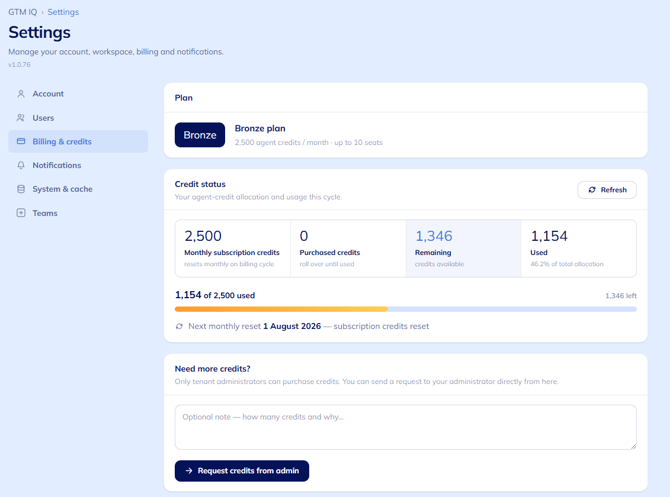
Note: This balance reflects everyone's usage, not just your own.
Manage background credit usage
It's not just the actions you select that uses credits. GTM IQ also does work in the background, from the same pool. These two settings are your main levers if you're managing a tight balance.
- Go to the Connections page and switch off sync to stop the daily data refresh.
- Note: Your data then only updates when you run a manual sync.
- Set your Monitoring agent's cadence to daily, weekly, or monthly on the watchlist settings. GTM IQ shows a credit estimate for each option before you commit
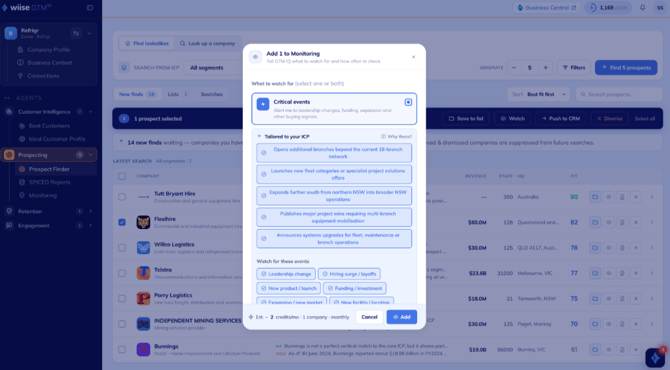
Tip: Check the estimate before you pick a cadence as a small drop from daily to weekly can meaningfully reduce your monthly draw.
Top up when you're running low
When your team's credits run out, agents pause until your credits reset or your admin tops up credits. Anything already running finishes first, so you're never cut off mid-report.
- If you're an admin, you'll need to buy extra credit packs for the whole team from within GTM IQ.
- If you're not an admin, send a credit request to your admin from within GTM IQ.
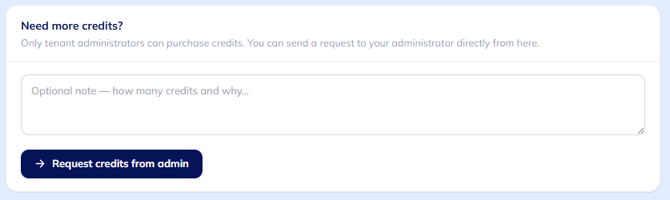
Note: GTM IQ uses extra credits only after plan credits run out, and top-up packs expire at the end of the month with no rollover.
Frequently asked questions
Do credits expire?
Plan credits reset monthly and don't let the credits roll over. Top-up packs expire at the end of the calendar month.
Who can buy more credits?
Only your GTM IQ admin can buy credit packs. Other users request credits from the admin inside the product.
Does reading a report cost credits?
No. Credits are only used when an agent does new work, such as generating, searching, analysing, or refreshing. Viewing something already created is free.
How do I use fewer credits?
Turn off the daily data refresh on the Connections page and sync manually instead. Select a lighter monitoring cadence as the estimate shown against each option tells you what it'll use.
Need more help?
No problem, that's what we're here for. Reach out to support@wiise.com anytime you can't find what you're looking for.