
Commitment Insights – New Power BI Dashboard
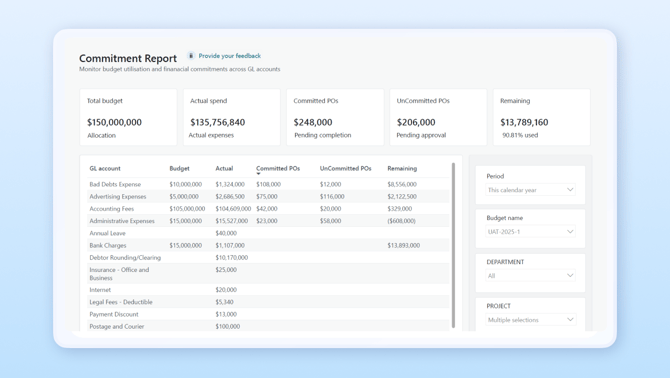
- Side-by-side comparison of actual spend, committed POs, and uncommitted POs against budgets
- Variance analysis to highlight areas of concern
- Drill-down tables for GL accounts with linked documents
- Interactive filters for date ranges and dimensions
Landed Cost Insights – New Power BI Dashboard
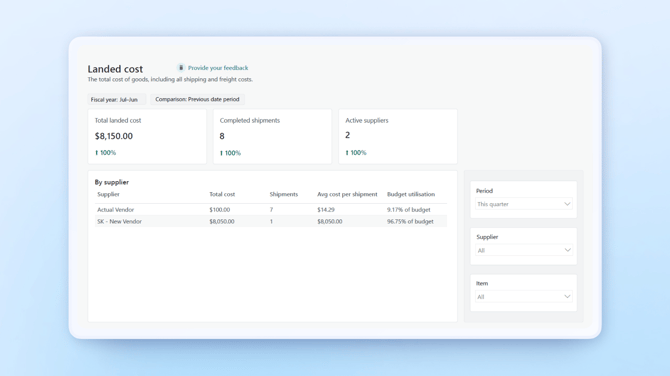
- View landed costs in real time by item, order, or supplier
- Drill into freight, duties, insurance, and other charges
- Track cost patterns and identify variances with trend analysis
- Apply filters and export data for reporting or audits
This makes it easier to accurately price products, protect margins and negotiate better with suppliers.
Item Journal Batch Approval Workflow
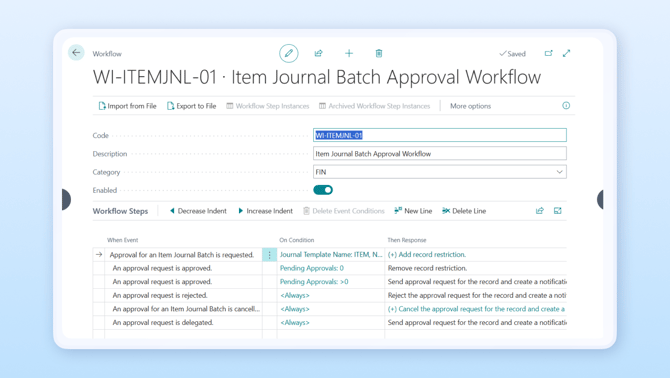
To help you strengthen internal controls and maintain inventory accuracy, we’ve added a new Item Journal Batch Approval Workflow to Wiise.
This new workflow improves inventory processes by allowing you to:
- Submit item journal batches for approval before posting
- Block posting until an authorised approver reviews and approves
- Configure approval conditions and approver methods via a setup wizard
- Track all approval actions for full audit visibility
This helps you to reduce errors, enforce segregation of duties, and maintain compliance to have confidence in your inventory data.
Flexible Stripe Surcharging
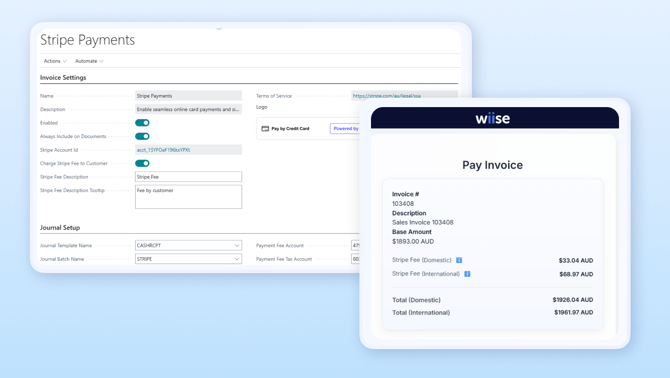
To help you protect margin and improve payment transparency, we’ve added the option to apply Stripe Surcharge fees to customer invoices in Wiise.
Rather than absorbing Stripe fees on every transaction, or changing product pricing, you can now toggle Stripe surcharging within Wiise, allowing you to:
- Pass Stripe processing fees directly to customers
- Display surcharge details clearly on a Wiise-hosted checkout page
- Add custom descriptions and tooltips for transparency
- Enable or disable the feature with a simple toggle
When activated, this makes it easier to retain full invoice value, simplify reconciliation, and give customers clarity on what they’re paying for.
Real Time Budget View
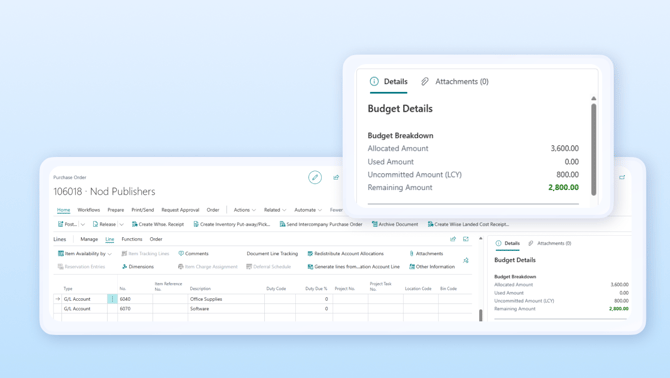
To help you prevent budget overruns and improve financial control, we’ve introduced a Real-Time Budget View in Wiise.
Instead of manually checking spreadsheets or separate reports, you can now get instant feedback on spend by:
- Seeing allocated budgets, actual spend, and remaining balance instantly while entering Purchase Orders or Purchase Invoices
- Viewing budget details for selected GL accounts and dimensions directly on the entry screen
- Getting clear visual indicators (green/amber/red) for budget status before committing spend
This makes it easier to stay within budget, enforce financial policies, speed up approvals, and give AP officers confidence that every transaction is compliant.